

Write-Off
Executive Summary
Purpose & Scope
- Support AR write-off processes that comply with GAAP, streamline approvals, and provide a robust audit trail.
- Scope includes: Eligibility review, packet creation and management, multi-level approvals (based on commission thresholds), NetSuite GL posting, packet and recovery workflows, status tracking, email notifications, and audit documentation.
- Out of scope: Commission booking, general AR collections, client onboarding, and tax reporting.
Objectives
- Establish standardized eligibility and documentation requirements
- Enforce dual-approval controls and proper authorization
- Ensure consistent execution and data retention for reliable reporting and audits
Process Overview
Approval Flow
graph TD
  Draft((Draft Packet))
  Submitted((Submitted))
  Agent((Agent Approval))
  DH((Dept Head Approval))
  VP((VP Client Acct Approval))
  CFO((CFO Approval))
  MD((MD Approval))
  Complete((Complete - Executed))
  Rejected((Rejected))
  Cancelled((Cancelled))

  Draft --> Submitted
  Submitted --> Agent
  Agent --> DH
  DH --> VP
  VP -->|< $50K| Complete
  VP -->|>= $50K| CFO
  CFO -->|$50K - $250K| Complete
  CFO -->|> $250K| MD
  MD --> Complete
  Agent -->|Reject| Rejected
  DH -->|Reject| Rejected
  VP -->|Reject| Rejected
  CFO -->|Reject| Rejected
  MD -->|Reject| Rejected
  Rejected -->|Resubmit| Submitted
  Rejected -->|Cancel| Cancelled
Figure 1: Packet Approval Flow with Commission-Based Routing
Core Rules & Requirements
Eligibility & Packet Creation
- Every receivable in a packet must have one eligibility criterion and supporting documentation—either attached at the receivable level or to the packet as a whole (if the 'Packet Document' flag is set).
| Eligibility Criterion | Documentation Required |
|---|---|
| Aged | Collection activity log |
| Uncollectible | Client communication or legal documentation |
| Bankruptcy | Court document |
| Agent Request | Formal written agent request |
All receivables in a packet must relate to a single client, and packet names must be unique.
Receivable Assignment Rule:
- A receivable can only be part of one packet at a time unless that packet has been Cancelled or Recovered.
Draft packets support add/remove/edit, mass-update, justification text, full delete, and multiple saves.
Packet submission is blocked unless all above requirements are satisfied.
Approval Matrix & Workflow
| Total Commission | Route/Required Approvers |
|---|---|
| < $50,000 | Agent → Dept Head → VP, Client Accounting |
| $50,000–$250,000 | Agent → Dept Head → VP CA → CFO |
| > $250,000 | Agent → Dept Head → VP CA → CFO → MD |
- Approval is sequential/role-driven as per above.
- Approver actions: approve (advance), or reject (return to Client Accounting with comments).
- All actions/time/reason/actor logged. Each transition triggers email notifications with actionable links.
- On resubmission, packet resumes workflow at appropriate stage.
Write-Off Execution & Integration
- Final approval triggers:
- Journal entry to zero balances & mark receivables "Written Off"
- Packet status set "Complete"
- Summarized AR posting to NetSuite with:
- DR: Bad Debt Expense
- CR: Accounts Receivable
- GL description includes packet reference/criteria breakdown
- Receivables flagged for CECL exclusion going forward
- Full audit log/audit trail persistence
Recovery & Audit
- Recovery (After Packet Completion):
- When a receivable that was written off as part of a completed packet is to be recovered, the user initiates the Recover action from the Packet Detail View.
- This action triggers reversal journal entries in both the Client Processing subledger and NetSuite General Ledger.
- The packet status is updated to Recovered (functionally equivalent to Cancelled for the purposes of receivable eligibility).
- All receivables in the packet are reopened and become available for standard cash application processing.
- A detailed audit trail is maintained for the entire recovery action.
- Partial Recovery is not permitted:
- Recovery reverses all receivables in the packet; individual receivable recovery within a packet is not supported.
- If only some receivables in a packet require recovery, the entire packet must still be recovered.
- Any receivables within the recovered packet that do not receive a recovery payment must be re-written off by creating a new packet and following the standard approval process.
- When a receivable that was written off as part of a completed packet is to be recovered, the user initiates the Recover action from the Packet Detail View.
User Interface Specifications
Write-Off Packet Screens
- Key Features:
- Receivable search (multiple fields/filters):
- Entity
- Department
- Deal
- Client
- Buyer
- Agent
- Invoice Number
- Invoice Date Range
- Commission Amount Min-Max Range
- Age (Days) Min-Max Range
- Packet Name
- Packet Status
- Write-Off Recommended Flag
- Search results grid with multi-select and “Create Packet” from selection
- Entity
- Department
- Deal
- Client
- Buyer
- Agent
- Invoice Number
- Invoice Date
- Commission Amount
- Age (Days)
- Write-Off Recommended Flag
- Packet Name Link to Packet Detail View
- Packet Status
- Validations: all must be for one client; checks for packet name uniqueness/required docs
- Receivable search (multiple fields/filters):
- Draft Mode:
- Packet header (name, client, totals, status)
- Packet Name
- Client
- Total Commission
- Packet Status
- Mass eligibility criteria updates and per-row override
- Document upload per row or for packet
- “Submit for Approval” only enabled once all docs/criteria present
- Packet header (name, client, totals, status)
Mockup: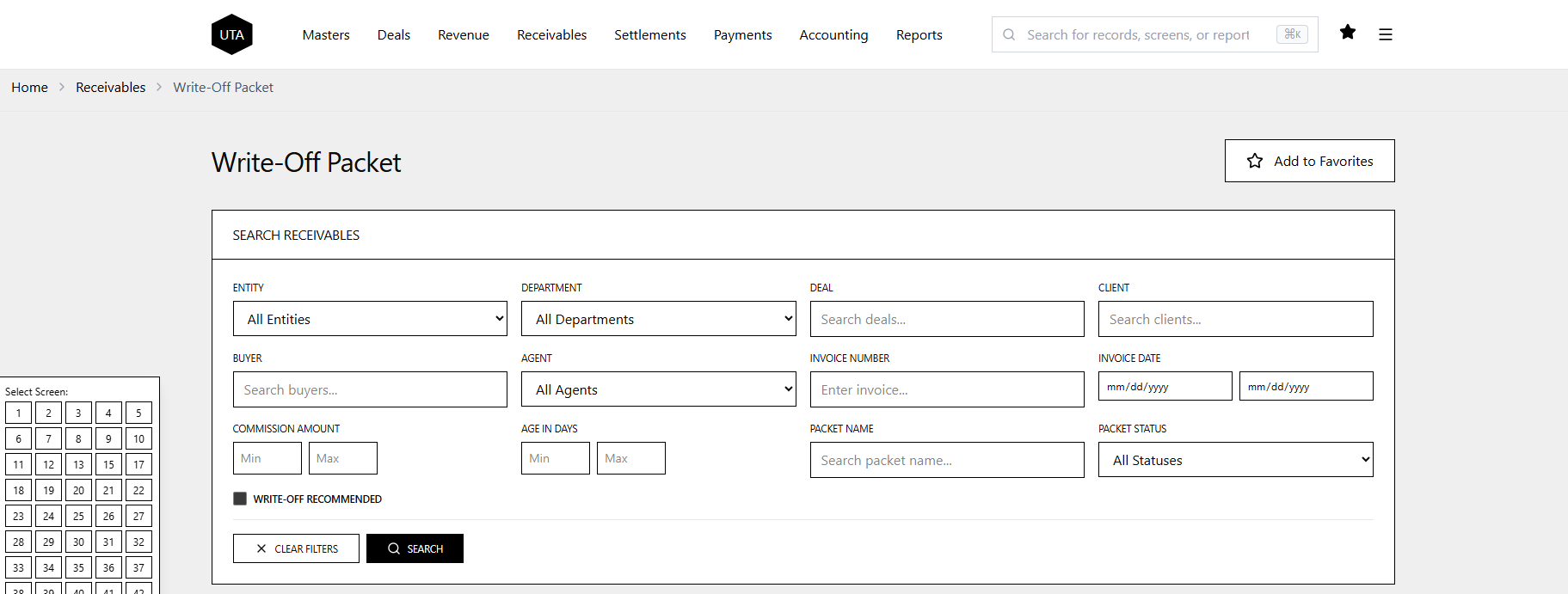
Figure: Write-Off Packet screen showing search criteria.
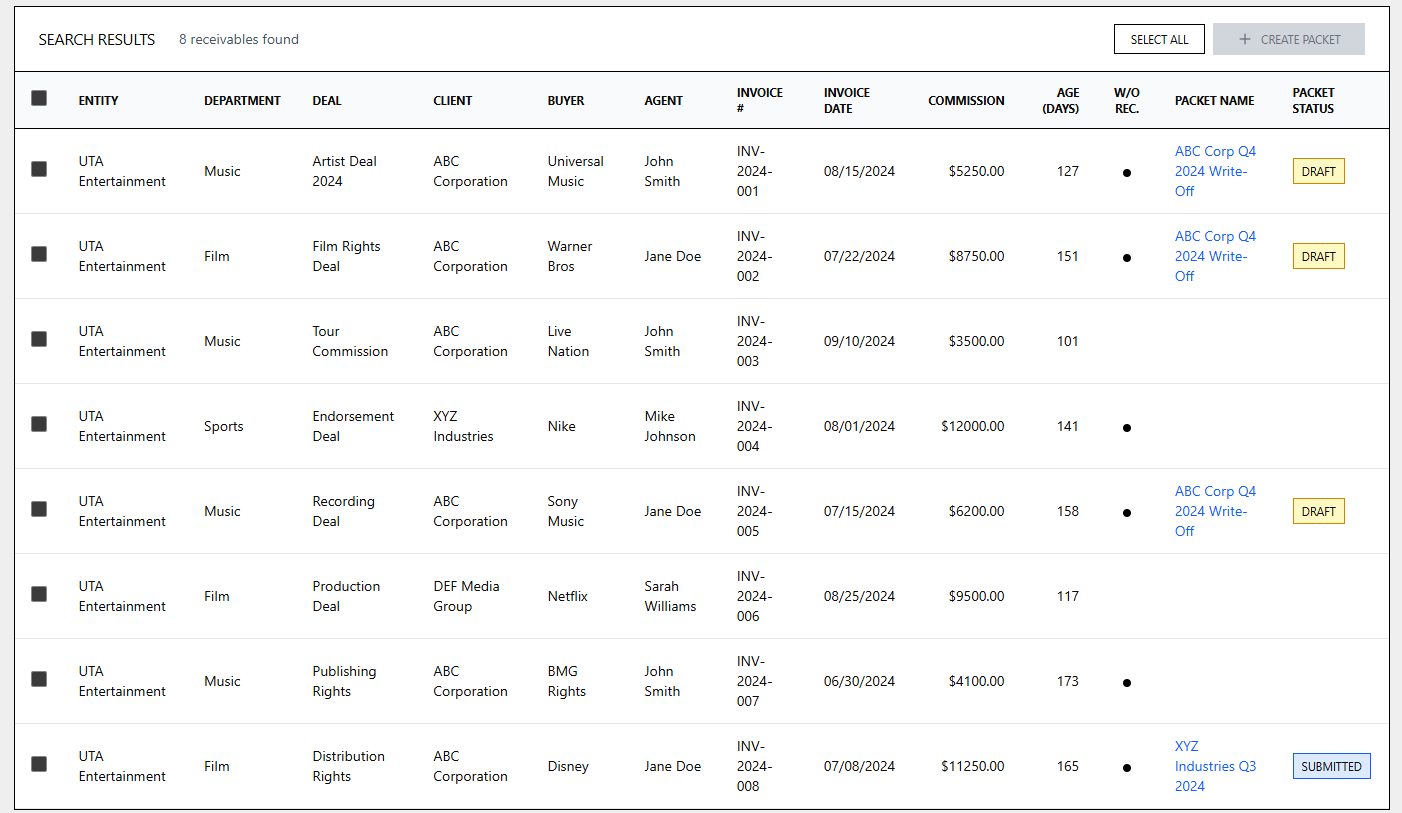
Figure: Write-Off Packet screen showing search results.
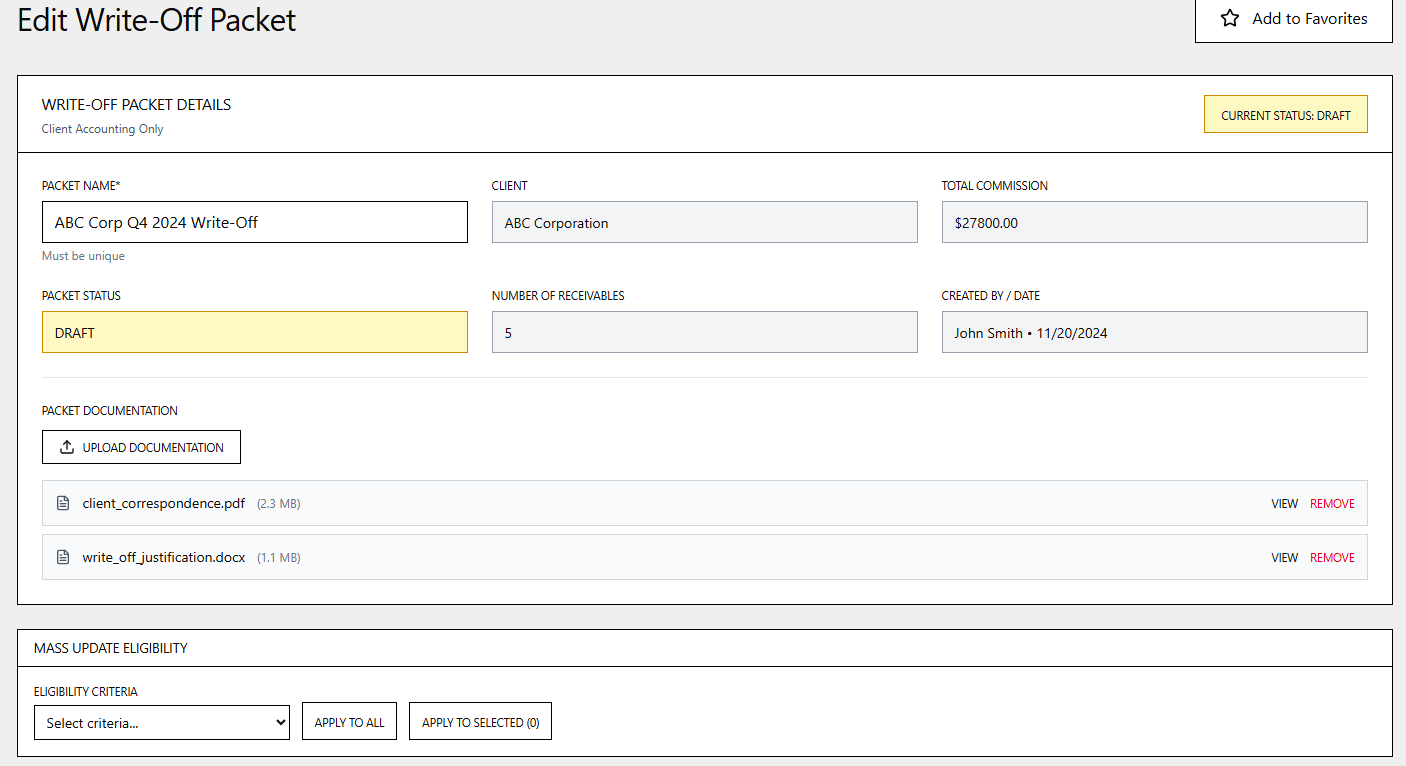
Figure: Edit Write-Off Packet screen in Draft Mode.
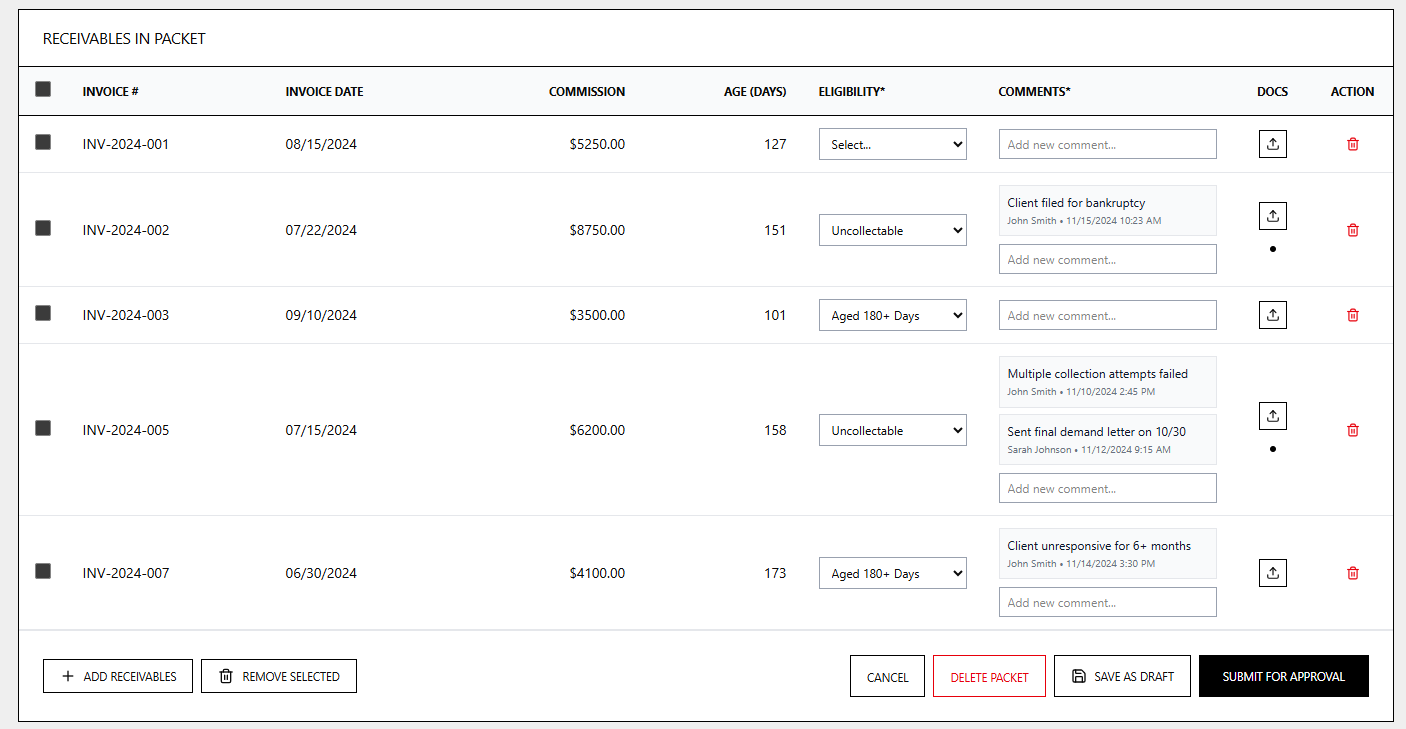
Figure: Edit Write-Off Packet screen in Draft Mode showing receivables in packet.
Approval Screen (All Roles)
- Approvers access this screen either by:
- Clicking actionable links in their email notifications (sent when a packet requires their review/approval), or
- Searching for packets on the Write-Off Packet screen that are awaiting their approval (filtered by status).
- The Approval screen is functionally identical to the Packet Detail View, displaying all the same fields and information.
- The only difference is that the Packet Status field is editable, limited to the status options valid for the current approver’s role (e.g., Approve, Reject).
- Packet Status Comment field will be required when rejecting.
- All non-approval edits (e.g., modifying receivables, documentation, or eligibility) remain restricted to Client Accounting; approvers cannot change packet content—only status and comments.
- After a status change, the system displays a completion/confirmation message and triggers appropriate workflow updates (e.g., advancing to next approver or notifying Client Accounting if rejected).
Mockup: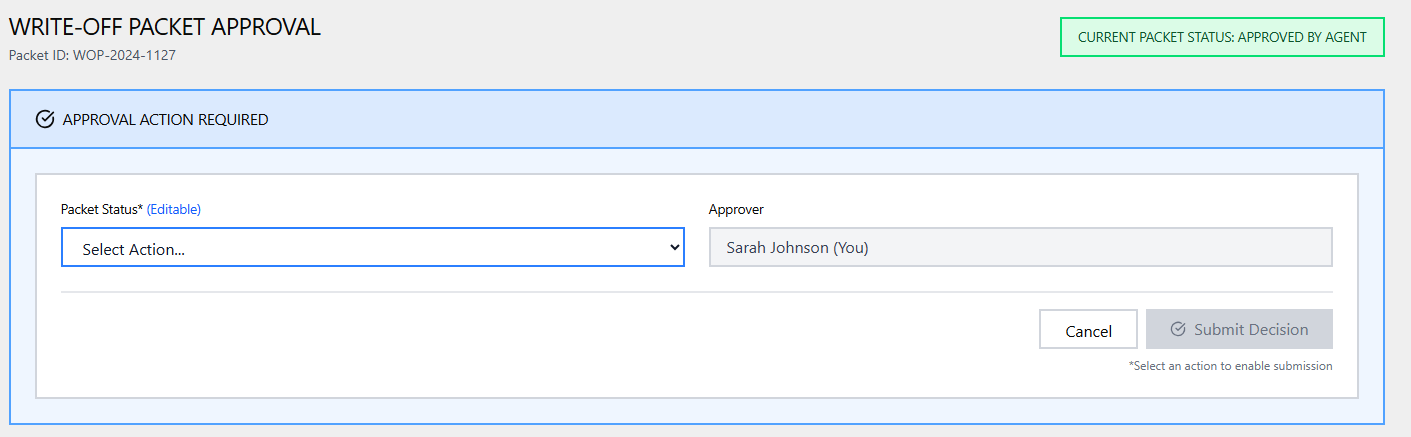
Figure: Approval screen status update section.
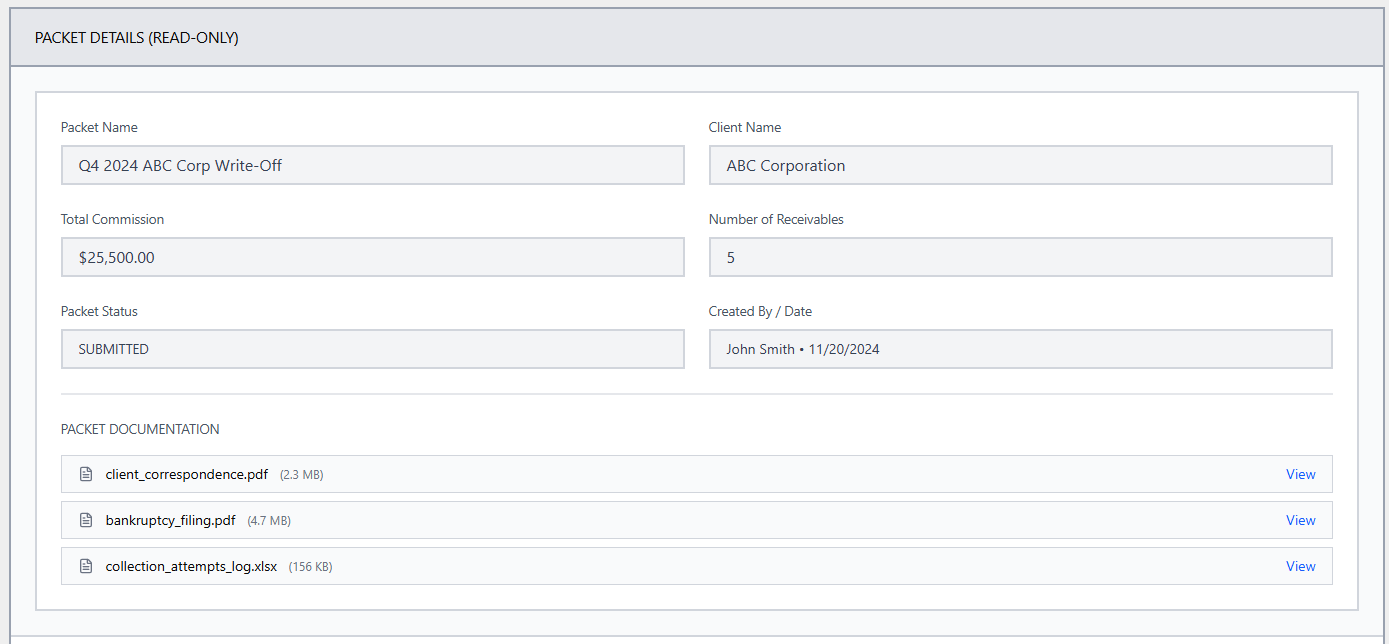
Figure: Approval screen packet detail section.
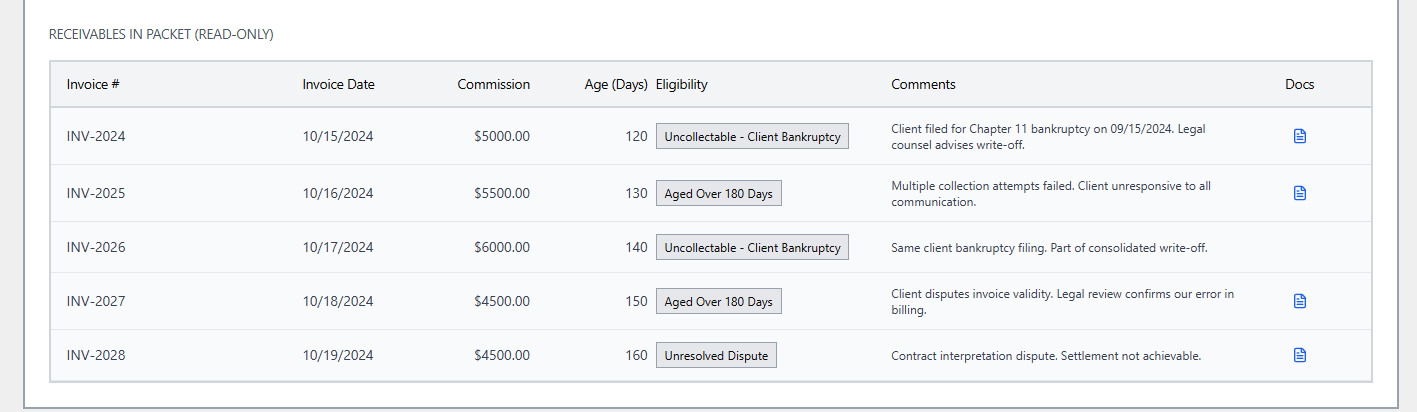
Figure: Approval screen receivables section.
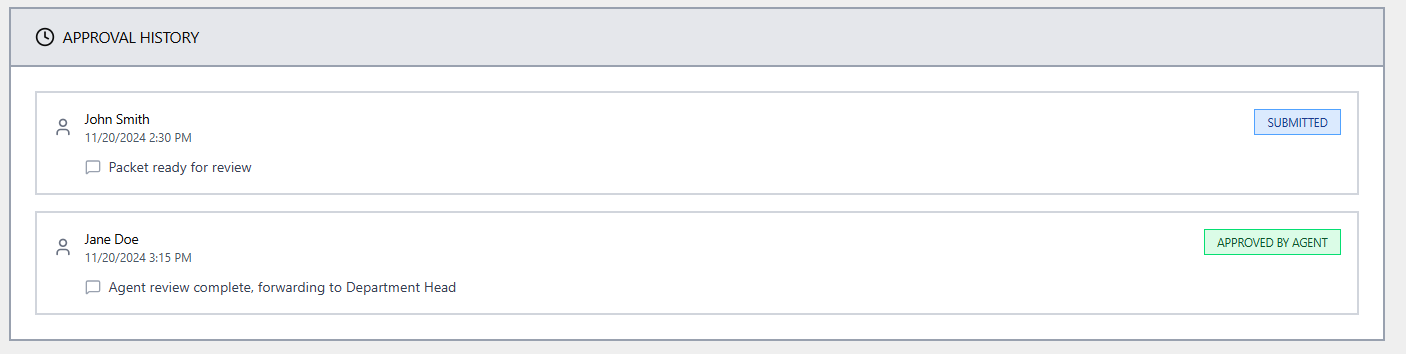
Figure: Approval screen status history section.
Recovery Processing Screen
- Client Accounting users must search for receivables associated with a completed packet using the Write-Off Packet search screen.
- When a completed packet is opened from the search results, the screen shows the Packet Detail View, with all fields read-only except for the Recover action.
- The Recover action is available only to users with the Client Accounting role and only for completed packets.
- Clicking Recover initiates the actions outlined in Recovery & Audit, including reversal of all receivables in the packet and triggering standard cash application processing.
Mockup: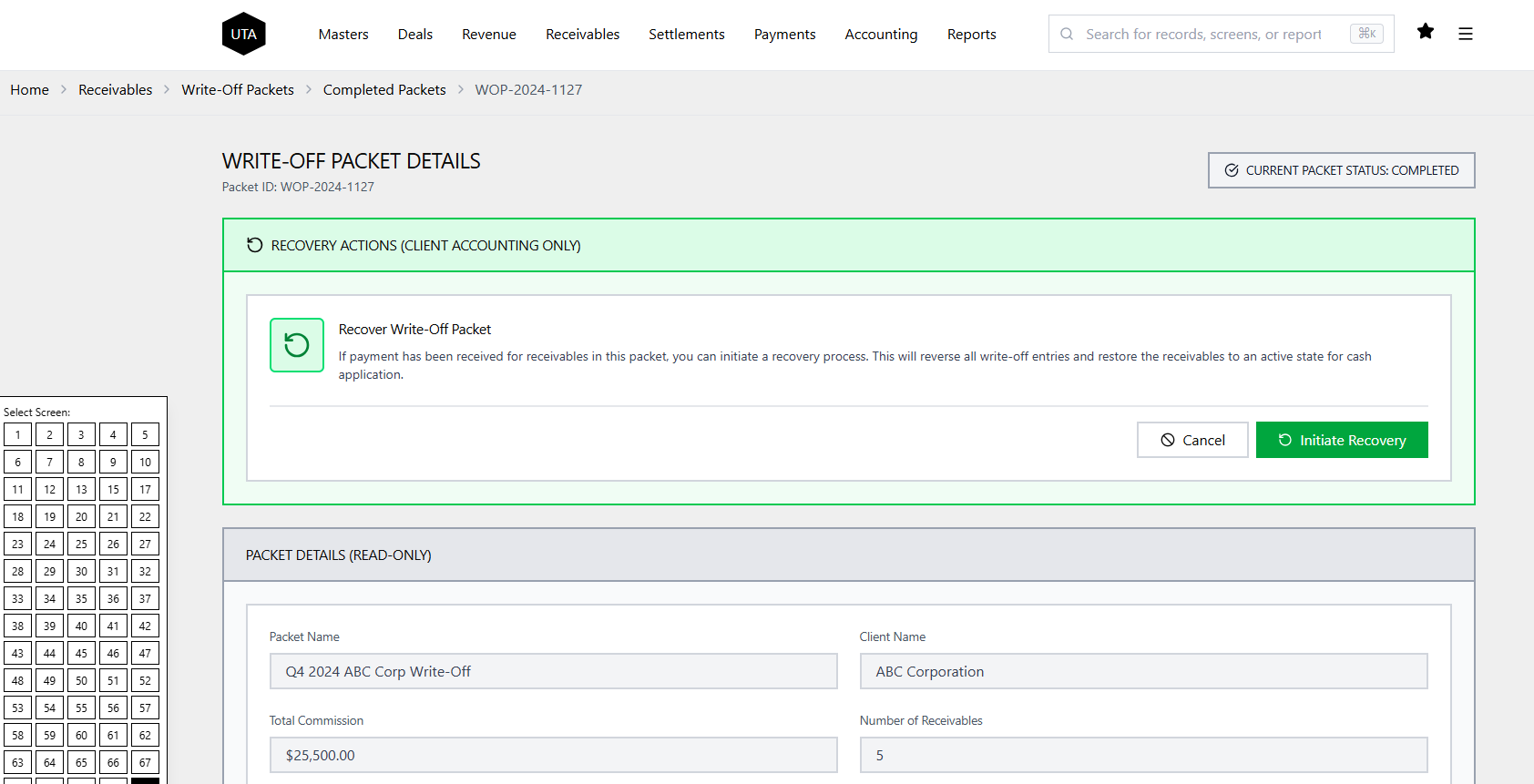
Figure: Recovery screen showing read-only packet details and Recover action.
Packet Detail View
Collapsible header showing all packet-level properties:
- Packet Name
- Client
- Total Commission
- Packet Status
- Approval History (all status changes, actions, approvers, timestamps, comments)
- Created By / Creation Date
- Upload Documentation [Button] (for packet-level documentation)
Receivables in Packet List:
- Invoice Number
- Invoice Date
- Commission Amount
- Age (Days)
- Eligibility Criterion
- Comments:
- Field to add or display justification for each receivable.
- Comments are versioned: The full history for each receivable’s comments is available, showing every previous comment along with the user and timestamp.
- Docs [Action]:
- Button/icon for uploading, downloading, or viewing documents at the receivable level.
- Delete (to remove individual receivable, if allowed by workflow/state)
Receivables-Level Actions (buttons for batch/packet operations):
- Add Receivables
- Remove Selected
- Cancel
- Delete Packet (entire packet)
- Save as Draft
- Submit for Approval (enabled only when all validations pass)
Mockup:
View complete interactive Figma prototype →
Data Requirements
All tables below have tracking for creation, last update, user, and status—all actions auditable.
Write-Off Packet Table
| Field Name | Data Type | Description |
|---|---|---|
| packet_id (PK) | GUID | Unique identifier for the packet. |
| packet_name | String | User-entered name for the packet; must be unique. |
| client_id (FK) | GUID | Reference to the Client entity; all receivables in the packet must share this client. |
| client_name | String | Denormalized client name for display and reporting. |
| total_commission | Decimal | Sum of receivable commissions included in the packet. |
| receivable_count | Integer | Number of receivables contained in the packet. |
| packet_status | Enum | Workflow state of the packet (e.g., Draft, Submitted, Completed). |
| created_by (FK) | GUID | User who created the packet. |
| created_date | DateTime | Timestamp when the packet was first saved. |
| updated_by (FK) | GUID | User who last updated the packet. |
| updated_date | DateTime | Timestamp of the last update to the packet. |
| submitted_by (FK) | GUID | User who submitted the packet for approval, if applicable. |
| submitted_date | DateTime | Timestamp when the packet was submitted for approval, if applicable. |
| completed_date | DateTime | Timestamp when the write-off associated with this packet was executed, if applicable. |
| packet_doc_ref | String | Reference to primary supporting documentation (e.g., folder ID, URL, or document key). |
packet_status ENUM Values:
- 'Draft'
- 'Submitted'
- 'Approved by Agent'
- 'Approved by DH'
- 'Approved by VP Client Accounting'
- 'Approved by CFO'
- 'Approved by MD'
- 'Rejected by Agent'
- 'Rejected by DH'
- 'Rejected by VP Client Accounting'
- 'Rejected by CFO'
- 'Rejected by MD'
- 'Resubmitted'
- 'Cancelled'
- 'Complete'
Packet-Receivable Link Table
| Field Name | Data Type | Description |
|---|---|---|
| packet_id (FK) | GUID | References the Write-Off Packet entity associated with this receivable. |
| receivable_id (FK) | GUID | References the Receivable entity included in the packet. |
| eligibility_criteria | Enum | Eligibility classification for write-off (see defined enum values). |
| justification | String | Optional justification or notes at the individual receivable level. |
| receivable_doc_ref | String | Reference to documentation attached specifically for this receivable (e.g., file ID, URL). |
| packet_doc_flag | Boolean | Indicates whether to rely on packet-level documentation instead of a receivable-level document (TRUE = use packet-level docs). |
eligibility_criteria ENUM Values:
- 'Aged'
- 'Uncollectible'
- 'Bankruptcy'
- 'Agent Request'
Validations Table
| Validation Rule | Context | Enforcement Method |
|---|---|---|
| Unique packet name | Packet | At creation/submission |
| All receivables share client_id | Packet-Receivable link | At packet creation/receivable add |
| One eligibility per receivable | Packet-Receivable link | At packet creation/submit |
| Documentation per receivable or packet (flagged) | Packet/Packet-Receivable link | At packet submission |
| Receivable only in one packet at a time (except if reopened) | Packet-Receivable link | At receivable add/packet reopen |
| Sequential approval enforced, no skips | Approval workflow | On approval status change |
Security & Data Retention
- Only Client Accounting users may create/edit/submit packets or process recoveries.
- Approval and status-change restricted by user’s role and workflow state.
- Initiators cannot approve their own submission.
- All actions, approvals, rejections, edits, and recoveries logged with timestamp/user.
- Data, audit trail, and docs retention per regulatory guidelines.