

Client Processing
Overview
The UTA Client Processing System serves as the core financial platform that enables the agency's business operations. The system facilitates transaction flow between buyers, clients, and participants while providing the tools and capabilities needed for effective marketplace operation. Through integrated components handling different aspects of financial processing, the system supports UTA's ability to manage complex deal structures, process transactions efficiently, and maintain high service levels for all stakeholders.
Client Processing fills a key component of the overall Client Framework ecosystem.
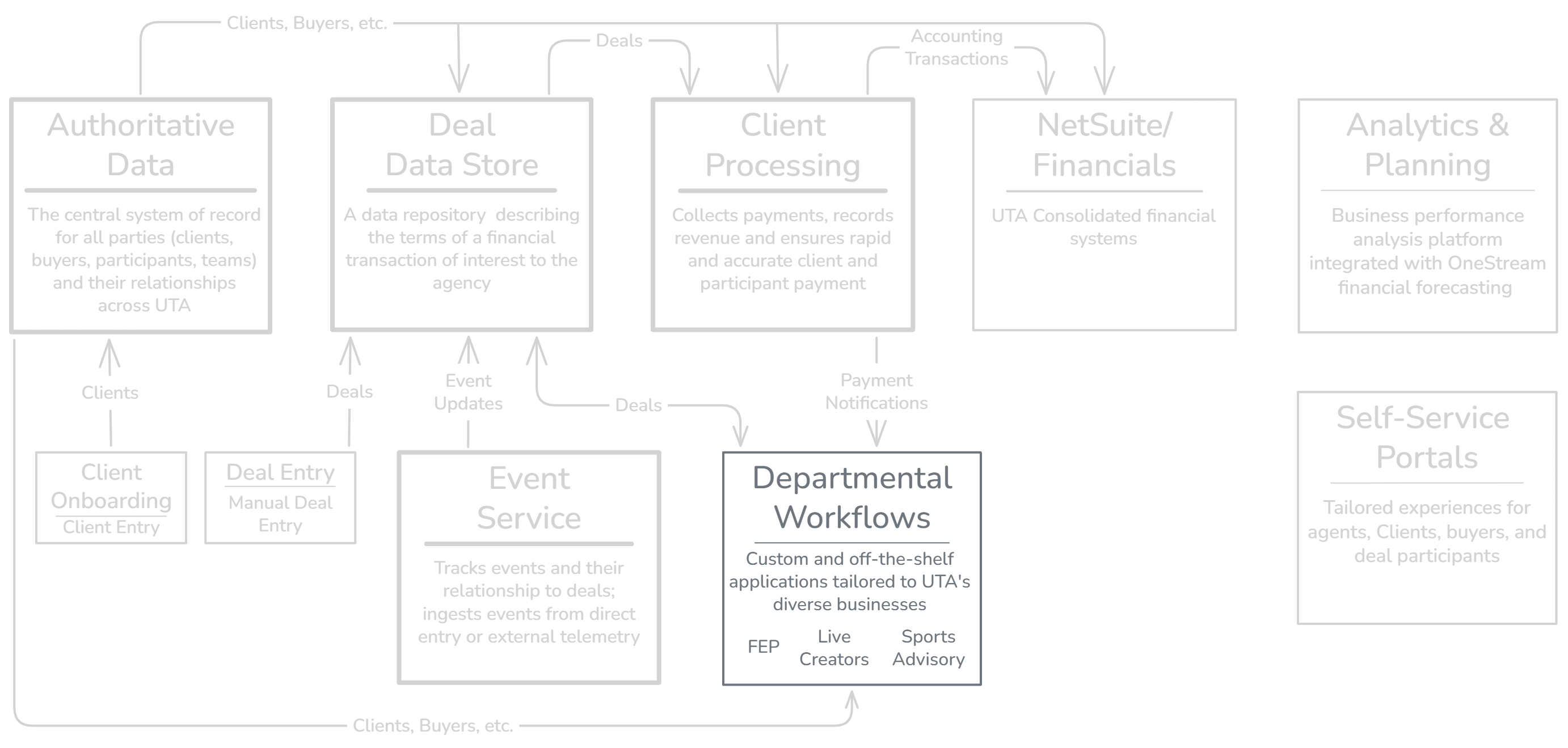
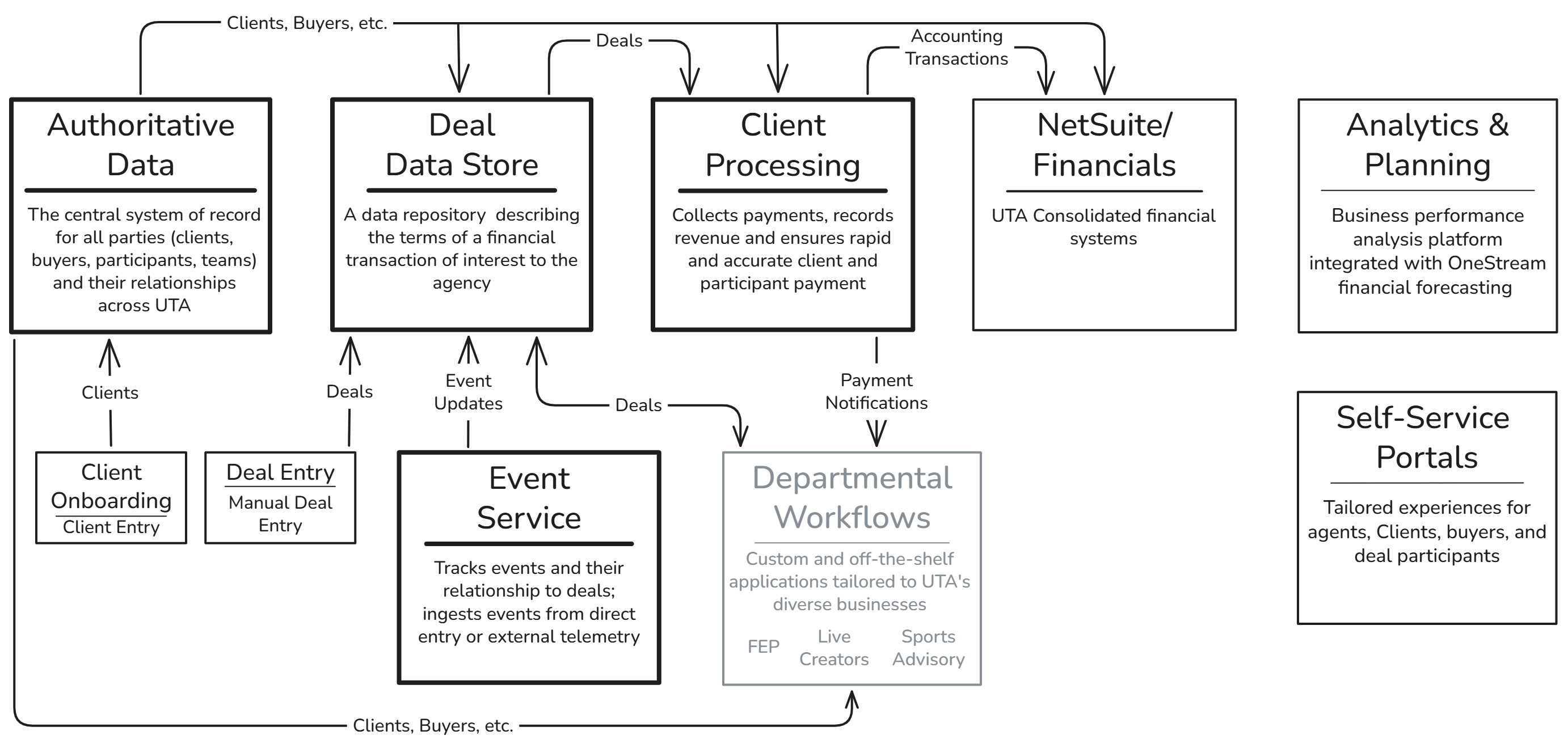
Client Processing functions and requirements are organized in 18 functions grouped into eight function groups, presented below in the order a financial transaction encounters them as it flows from origination to completion. The Functional Approach describes the fundamental design principles for Client Processing. The Transaction Inventory lists the transactions within each function.
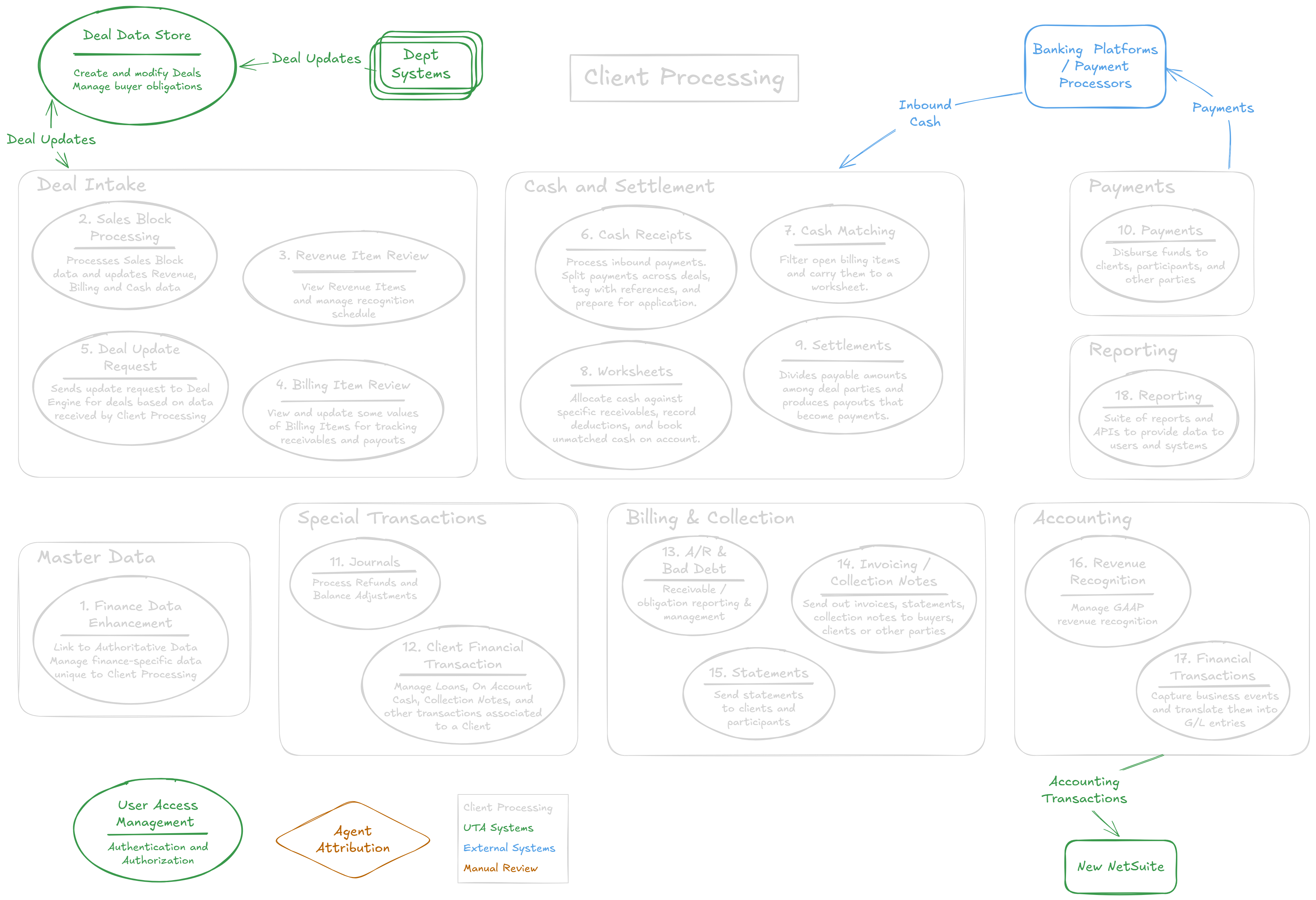
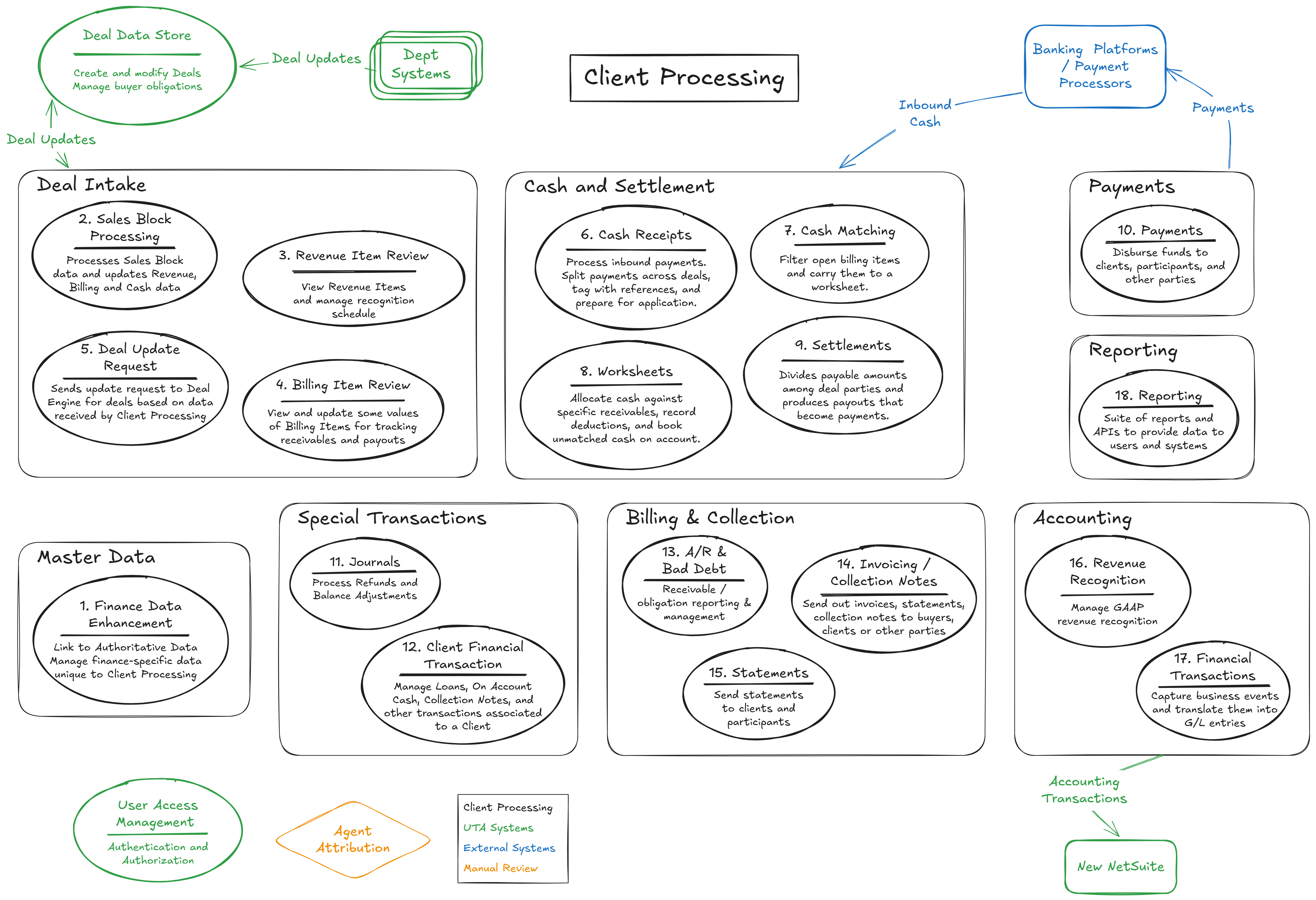
Function Groups and Functions
Master Data
- 01. Client Finance Data Enhancement — Adds Client Processing–specific finance data to the underlying Authoritative Data records and maintains the link between them. This establishes the finance master data the rest of the system depends on. The exact boundary between Authoritative Data and Client Processing is not yet designed; this area is a placeholder for that seam.
Deal Intake
- 02. Sales Block Processing — Accepts deal updates published by the Deal Data Store as sales blocks and provides the workflows to process them — approvals, guardrails, and change tracking — validating each block and generating the revenue items and billing items (each split into REV and PAY lines) that seed the rest of the flow.
- 03. Revenue Item Review — Shows the current state of revenue and its recognition schedule, allows change auditing and schedule adjustments, and lets users trigger Deal Update Requests when the underlying deal data needs correcting.
- 04. Billing Item Review — Shows the current state of payment terms and the receivables being tracked, lets users adjust deductions, collection styles, and notes, and lets users trigger Deal Update Requests. Payment-term changes delegate back to the Deal Data Store.
- 05. Deal Update Requests — An event raised by rule or user action that starts a workflow in the Deal Data Store to update milestones, revenue amounts, dates, payment terms, or other deal data Client Processing does not own. This is the return channel that keeps the integration bidirectional. The precise round-trip contract is being finalized jointly with the Deal Data Store team.
Cash and Settlement
- 06. Cash Receipts — The front door for inbound cash. Money arrives from the bank as CAMT files or manual entries and becomes cash receipts, which are split across deals and clients, tagged with references, and prepared for application. Nothing downstream can happen until cash lands here.
- 07. Cash Matching — Uses the references on a cash split to filter the universe of open billing items down to the receivables a given receipt is meant to pay, and carries the selected receivables into a worksheet. Matching identifies which receivables; it stops short of entering amounts.
- 08. Worksheets — The central cash-application document, where cash is allocated against specific receivables across their REV and PAY lines, deductions are recorded, and unmatched cash is booked on account. Worksheets enforce segregation of duties through a Draft → Applied → Settled → Approved lifecycle with a formal, immutable return path for corrections.
- 09. Settlements — Divides the PAY portion of applied cash among the deal parties — artist, manager, lawyer, business manager, and other participants — according to their commission terms, and produces the payouts that become payments. Standard show collections may be settled in bulk through the Mass Settlement packet-and-approval path.
Payments
- 10. Payments — Requests to pay a party, generated from settlements, journals, or user request. Payments carry approval and scheduling workflows (immediate, future-dated, or held), select the correct bank adapter, transmit to the bank, and post to the GL only after the bank confirms.
Special Transactions
- 11. Journals — Adjusts balances through zero-balance cash actions such as applying on-account money, issuing refunds, and other reallocations that move funds without a new bank receipt. Described at a summary level in the current documentation.
- 12. Client Financial Transaction — Displays and manages client-specific financial situations such as loans, on-account cash, collection notes, and write-off requests — the client-level context that spans multiple deals.
Billing & Collection
- 13. AR and Bad Debt — Provides the request-and-approval workflows for AR adjustments and write-offs handled outside the Deal Data Store, including tiered approval escalation by dollar amount and a recovery path when a written-off receivable is later paid.
- 14. Invoicing and Collection Notes — Generates and sends invoices and collection requests to buyers, clients, or other parties, with workflows for system generation, finance-user request, and external request. Issuing an invoice is a communication act that documents an existing obligation; it does not post a GL transaction (except for tax invoices in jurisdictions such as the UK).
- 15. Statements — Generates and sends statements — client, settlement, deal, and AR aging — to clients, buyers, and other parties, with the same system, finance-user, and external initiation paths as invoicing. Like invoices, statements report on the financial picture rather than create entries in it.
Accounting
- 16. Revenue Recognition — A backend process that evaluates the current state of revenue items and generates the Financial Transactions to be posted, handling immediate, monthly, and cash-based recognition styles and absorbing adjustments without manual GL entries.
- 17. Financial Transactions — All activity in Client Processing is modeled to match the underlying business events, not as debits and credits. A set of re-runnable accounting jobs translates that activity into compliant, balanced accounting data, batched and reviewed before being fed to the NetSuite GL. The live GL transmission adapter is in design and not yet implemented in the proof-of-concept.
Reporting
- 18. Reporting — A combination of canned reports, dashboards, and custom views to help users view data and workflow status, along with reporting APIs exposed for external and analytics needs. Interim reporting is delivered through Power BI while the long-term function is built.
Additional background detail on required scope and capabilities for Client Processing is included in the Client Processing Scope and Capabilities document, Version 4, dated May 6, 2025. Note that this document uses a different function taxonomy but covers the same capabilities.